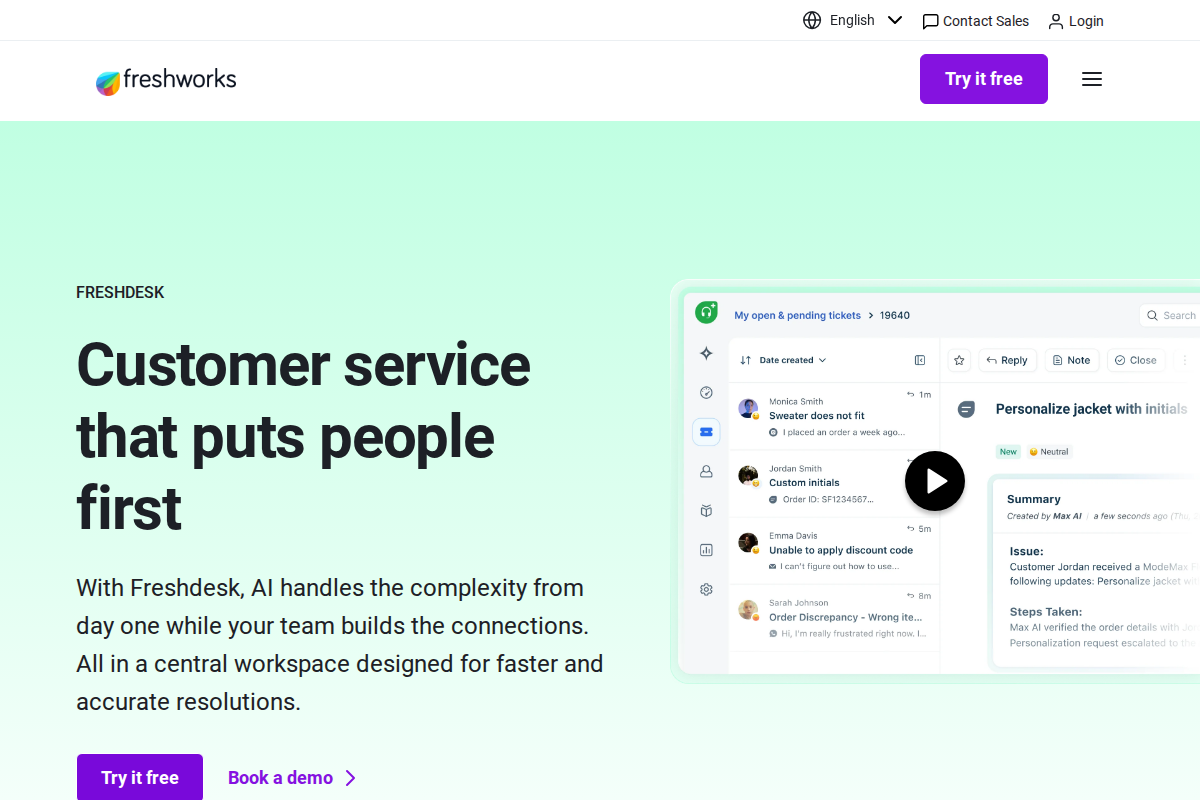
Freshdesk built its reputation on value. Similar features to Zendesk at 30-40% lower cost. The free plan is actually usable, and paid tiers scale affordably. Here's exactly what you'll pay, what each plan includes, and how to optimize costs for your team.
Plans at a Glance
| Plan | Monthly Cost | Annual Cost | Best For |
|---|---|---|---|
| Free | \$0 | \$0 | Small teams starting out |
| Growth | \$15/agent | \$12/agent | Teams needing automation |
| Pro | \$49/agent | \$39/agent | Advanced features and reporting |
| Enterprise | \$79/agent | \$69/agent | Large organizations |
Key advantage: The free plan includes unlimited agents, which is rare among competitors.
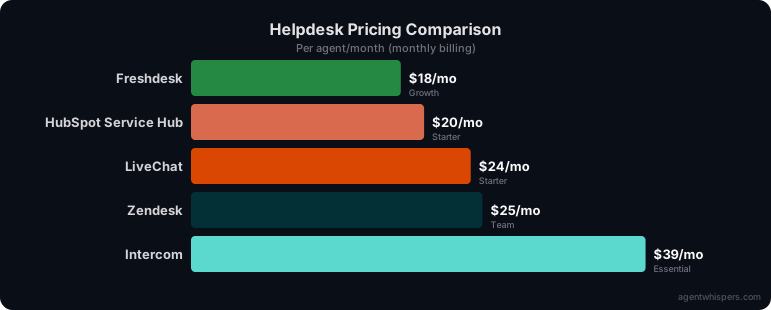
Free Plan: \$0 (What's Included)
Surprisingly generous:
- Unlimited agents (seriously)
- Email, social, and phone ticketing
- Knowledge base
- Basic reporting
- Mobile apps (iOS/Android)
- 1,000+ integrations
- Community support
Limitations:
- No automation (manual ticket assignment only)
- No SLA management
- Limited customization
- Community support only
- No custom roles
Who should use: Teams of 3-10 agents with basic needs. Startups testing helpdesk software. Side projects with minimal support volume.
Real-world usage: You can run actual support on this plan. Many small businesses operate on Free for 6-12 months before needing automation.
When to upgrade: When you need automation, SLAs, or grow frustrated with manual ticket assignment. Most teams upgrade around 5-10 agents.
Growth Plan: \$15/Agent (\$12 Annual). Best Value
Everything in Free, plus:
- Automation and workflows
- SLA management with alerts
- Custom ticket fields
- Multilingual support
- Advanced reporting
- Live chat (up to 100 agents)
- Phone support
- Email support from Freshdesk
Automation capabilities:
- Auto-assign tickets based on rules
- Send notifications on ticket events
- Escalate overdue tickets
- Set up time-based actions
- Route tickets by keywords, requester, or properties
SLA management:
- Set response and resolution targets
- Breach alerts before deadlines
- Escalation rules for violations
- Business hours configuration
- Multiple SLA policies
Why this matters: Automation eliminates manual work. SLAs ensure consistent service. Custom fields let you track what matters to your business.
Real-world cost:
- 5 agents: \$75/month (\$60 annual)
- 10 agents: \$150/month (\$120 annual)
- 20 agents: \$300/month (\$240 annual)
Who should buy: Most teams. At \$12-15/agent, it's the sweet spot of features and price. Unless you need AI or advanced analytics, Growth covers everything.
Pro Plan: \$49/Agent (\$39 Annual). Advanced Features
Everything in Growth, plus:
- Round-robin ticket assignment
- Custom roles and permissions
- Advanced analytics and dashboards
- Multiple SLA policies
- Freddy AI assistant
- Portal customization
- Sandbox environment
- Custom apps
Key additions:
Round-robin assignment distributes tickets evenly among agents automatically. No more cherry-picking or uneven workloads.
Freddy AI suggests responses and next actions based on ticket content. Summarizes long conversations. Predicts ticket fields.
Sandbox lets you test changes safely before going live. Essential for teams with complex configurations.
Advanced analytics:
- Custom dashboards
- Trend analysis
- Agent performance metrics
- Customer satisfaction tracking
- Export capabilities
Real-world cost:
- 10 agents: \$490/month (\$390 annual)
- 20 agents: \$980/month (\$780 annual)
- 50 agents: \$2,450/month (\$1,950 annual)
Who should buy: Teams of 20+ agents needing advanced routing, AI assistance, or detailed analytics. Also for teams wanting sandbox testing.
Enterprise Plan: \$79/Agent (\$69 Annual). Maximum Features
Everything in Pro, plus:
- IP whitelisting
- HIPAA compliance
- Dedicated account manager
- 99.9% uptime SLA
- Advanced security features
- Custom email servers
- Data residency options
Security features:
- SSO (SAML 2.0)
- Advanced access controls
- Audit logs
- Field-level permissions
Compliance:
- HIPAA BAA available
- GDPR compliance tools
- Data retention policies
Who should buy: Large organizations (100+ agents), healthcare companies, financial services, or any organization with strict compliance requirements.
Implementation and Setup Costs
Getting started with Freshdesk is straightforward compared to enterprise alternatives. Most teams complete basic setup within 2-5 days. The process involves creating your account, configuring support channels, setting up automations, and importing existing data.
Data migration from other platforms is well-supported. Freshdesk provides free import tools for popular platforms like Zendesk, Zoho Desk, and Gmail. These tools handle tickets, contacts, knowledge base articles, and basic configurations automatically. Custom fields and complex workflows may require manual recreation, but the migration process is generally smoother than competitors.
Training requirements are minimal. Freshdesk's interface is designed for simplicity, and most agents become productive within a few hours. The company provides extensive documentation, video tutorials, and community forums. For larger teams, you might want to create internal documentation specific to your workflows.
Initial setup costs are typically limited to staff time. Plan for 1-2 weeks of reduced productivity during the transition period as agents learn the new system. Unlike some competitors, Freshdesk doesn't require expensive consultants for basic implementation.
Hidden Costs (There Aren't Many)
Freshdesk pricing is more straightforward than competitors. Most features are included in base plans.
Potential add-ons:
- Additional phone numbers: ~\$1-3/month per number
- Advanced call routing: Included in Growth+
- Additional sandboxes: Enterprise only
What's NOT extra (included in base plans):
- Freddy AI (Pro+)
- Sandbox (Pro+)
- Advanced analytics (Pro+)
- Custom apps (Pro+)
Comparison: Zendesk charges \$50/month for Advanced AI and \$100/month for sandbox. Freshdesk includes these in base plans. This represents significant savings.
Annual vs. Monthly Savings
| Plan | Monthly | Annual (per month) | Savings |
|---|---|---|---|
| Growth | \$15 | \$12 | 20% |
| Pro | \$49 | \$39 | 20% |
| Enterprise | \$79 | \$69 | 13% |
Annual billing math: For a 10-agent Growth team:
- Monthly: \$150 × 12 = \$1,800/year
- Annual: \$120 × 12 = \$1,440/year
- Savings: \$360/year
Recommendation: If you're committed to Freshdesk for 6+ months, annual billing pays for itself.
Real-World Cost Examples
Small Team (5 agents)
- Plan: Growth annual
- Cost: \$60/month
- Total: \$720/year
- Comparable Zendesk cost: \$1,320/year (\$600 savings)
Mid-Size Team (20 agents)
- Plan: Growth annual
- Cost: \$240/month
- Total: \$2,880/year
- Comparable Zendesk cost: \$5,280/year (\$2,400 savings)
Large Team (50 agents)
- Plan: Pro annual
- Cost: \$1,950/month
- Total: \$23,400/year
- Comparable Zendesk cost: \$42,000/year (\$18,600 savings)
Migration from Other Platforms
Switching to Freshdesk from competitors is relatively painless compared to other helpdesk migrations. The platform's import tools support most major competitors, making data transfer straightforward.
From Zendesk: Freshdesk provides a dedicated Zendesk importer that handles tickets, contacts, knowledge base articles, and basic settings. Plan for 1-2 weeks to complete the migration, including testing and agent training. Custom automations and workflows will need manual recreation.
From Gmail or Outlook: Migration is simple using Freshdesk's email forwarding and import tools. You'll maintain your existing email addresses while gaining ticket management features. Most teams complete this transition in under a week.
From Zoho Desk: The migration process is similar to Zendesk. Export your data as CSV files and use Freshdesk's import tools. The two platforms have similar data structures, making this one of the easier migrations.
Regardless of your current platform, plan for a 1-2 week parallel operation period where both systems run simultaneously. This ensures no customer requests fall through cracks during the transition.
Freshdesk vs. Zendesk Pricing
| Plan | Freshdesk | Zendesk | Savings |
|---|---|---|---|
| Entry | \$0 (free) | \$19/agent | 100% |
| Growth | \$12-15/agent | \$49-55/agent | 73% |
| Pro | \$39-49/agent | \$79-89/agent | 51% |
| Enterprise | \$69-79/agent | \$99-115/agent | 30% |
Bottom line: Freshdesk is consistently 30-73% cheaper than equivalent Zendesk plans.
When Freshdesk Makes Sense
Choose Freshdesk when:
- Budget is a primary concern
- You want a real free tier to start
- You need comprehensive helpdesk features
- You want predictable per-agent pricing
- You're migrating from email to helpdesk
Consider alternatives when:
- You need enterprise-grade complexity (Zendesk)
- You want CRM integration (HubSpot)
- You're focused on proactive engagement (Intercom)
- You need flat-rate pricing for large teams (Crisp)
Getting the Best Deal
Annual commitment: Save 13-20% by paying yearly
Nonprofit discount: 50% off all plans for verified nonprofits
Startup program: Special pricing for accelerator companies
Volume discounts: Available at 100+ agents on Enterprise
Migration and Setup Costs
One-time costs:
- Data migration: Free (Freshdesk provides tools) or \$500-1,500 for consultant
- Setup time: 1-3 days for basic config, 1-2 weeks for advanced
- Training: Minimal. Freshdesk is intuitive. Budget 2-4 hours per agent.
Migration advantages:
- Free tools from Zendesk, Gmail, and CSV
- Automatic contact and ticket import
- Knowledge base import
- Most migrations complete in 1-3 days
What Real Users Say About Freshdesk
Overall sentiment: Freshdesk averages 4.1/5 on G2 with an 89 Net Emotional Footprint score on SoftwareReviews, with users praising value at \$19-\$69/agent while criticizing support responsiveness and recent UX changes.
What users consistently praise:
PCMag and Research.com reviews highlight real-time analytics and CRM integration as standout features, with managers specifically citing live call monitoring and performance metrics for coaching. The Pro plan at \$69/agent (annually) unlocks capabilities like custom fields and round-robin assignment that users compare favorably to Zendesk's higher pricing. Freddy AI's automated ticket summarization receives consistent praise for handling long conversation threads efficiently.
Recurring complaints:
Trustpilot reviews (1-2 star ratings from December 2025) express frustration with customer service responsiveness and recent interface updates removing functionality without warning. Reddit users in r/CRM and r/msp report steep learning curves during implementation.
The non-obvious takeaway:
Trustpilot data reveals a correlation between negative reviews and recent pricing changes, with multiple users citing refund policy disputes and billing surprises. This suggests Freshdesk's transition from startup-friendly pricing to enterprise tiers created tension with some early adopters.
Sources: PCMag, Research.com, SoftwareReviews, Trustpilot, Reddit, G2. Data aggregated February 2026.
Freshdesk Price Tracker
We monitor Freshdesk pricing weekly and log every change.
Current Verified Prices
| Plan | Monthly | Annual |
|---|---|---|
| Growth | \$18/agent/mo | \$15/agent/mo |
| Pro | \$59/agent/mo | \$49/agent/mo |
| Enterprise | \$95/agent/mo | \$79/agent/mo |
Price stability: 🟢 Stable
No price changes detected across 5 data points.
Quick facts:
- Free tier: Yes, no credit card required
- Lowest paid plan: \$15/mo (annual)
- Tracking since: January 18, 2026
- Last verified: February 15, 2026
Prices verified against official Freshdesk pricing pages.
Frequently Asked Questions
Is Freshdesk really free?
Yes. Unlimited agents, email ticketing, knowledge base, phone support. Forever free with no credit card required.
What's the catch with free?
No automation, no SLAs, limited customization. But functional for basic support operations.
Can I mix free and paid agents?
No. All agents must be on the same plan tier.
Are there discounts?
Annual billing saves 13-20%. Non-profits get 50% off. Volume discounts at 100+ agents.
Is there a free trial for paid plans?
Yes, 21 days. No credit card required. Full feature access.
Can I downgrade if I overestimated needs?
Yes. Downgrades take effect at next billing cycle.
Does Freshdesk integrate with my tools?
Yes. 1,000+ integrations including Salesforce, Slack, Shopify, Zapier, and major CRMs.
How does Freshdesk compare to Zendesk?
Freshdesk offers 90% of Zendesk's features at 60% of the cost. Zendesk wins on enterprise complexity; Freshdesk wins on value.
The Bottom Line
Freshdesk pricing delivers exceptional value. The free plan is actually functional, Growth plan ($12-15/agent) covers most needs, and you're paying 30-50% less than Zendesk for similar features.
Best value sweet spot: Growth plan with annual billing for teams of 5-20 agents. Only upgrade to Pro if you need AI, sandbox, or advanced analytics.
Start with free. Upgrade to Growth when you need automation. The pricing scales fairly and transparently. No hidden costs, no surprises.
Related Articles
- Freshdesk Review. Complete feature analysis
- Zendesk vs Freshdesk. Head-to-head comparison
- How to Choose Helpdesk Software. Selection framework
- Best Helpdesk for Small Business. Top picks

Erika A.
Pricing & Comparison SpecialistErika breaks down SaaS pricing tiers, hidden fees, and value-for-money across helpdesk and customer support tools at AgentWhispers. Her comparison frameworks help teams make informed purchasing decisions.