Salesforce created the modern CRM category and dominates enterprise markets worldwide. Pipedrive challenged it with sales-focused simplicity specifically designed for SMBs. They rarely compete directly, but understanding their different approaches helps you choose the right tier for your current and future needs.
Quick Verdict
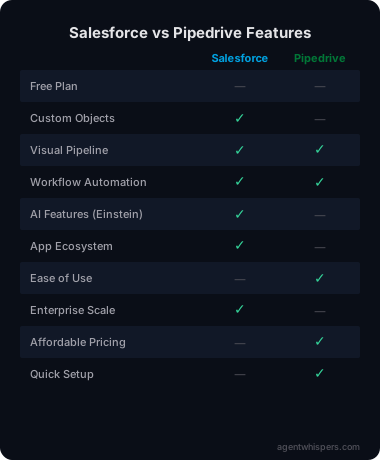
| Use Case | Winner |
|---|---|
| Enterprise scale | Salesforce |
| SMB simplicity | Pipedrive |
| Customization | Salesforce |
| Ease of use | Pipedrive |
| Value for money | Pipedrive |
| Feature depth | Salesforce |
| Setup speed | Pipedrive |
| App ecosystem | Salesforce |
Bottom line: Pick Pipedrive if you're an SMB wanting simple, effective sales management. Choose Salesforce if you're enterprise or need extensive customization and scale.
Pricing Compared
Salesforce is more expensive upfront and requires significant implementation costs and ongoing maintenance. Pipedrive you can set up yourself in hours without technical expertise, consultant fees, or extensive training.
Enterprise Scale
Salesforce wins. Handles 10,000+ users, complex org structures, global deployments, and industry-specific solutions.
Pipedrive tops out around 1,000 users maximum. Great for SMBs, not built for massive enterprise scale.
Ease of Use
Pipedrive wins. The visual pipeline is intuitive from day one. Most teams productive in hours.
Salesforce requires training. Certification courses, implementation consultants, dedicated admins. Powerful, but complex.
Customization
Salesforce wins. Almost infinitely customizable:
- Custom objects and fields
- Apex code for custom logic
- Visualforce for custom interfaces
- Workflow automation
- Integration platform (MuleSoft)
Pipedrive offers customization within its sales framework. Salesforce lets you build anything.
Implementation
Pipedrive wins. Set up yourself in hours. No consultants needed.
Salesforce typically requires $5K-50K+ in implementation costs plus weeks of setup. Many organizations budget $10K-25K just for initial configuration before adding ongoing admin costs.
Feature Depth
Salesforce wins. Comprehensive features across sales, service, marketing, analytics, and more.
Pipedrive focuses on sales pipeline and does it well. Salesforce does everything across sales, service, marketing, and analytics. Most SMBs never use 80% of Salesforce's capabilities.
App Ecosystem
Salesforce wins. AppExchange has thousands of apps. Integrations with virtually everything.
Pipedrive has good integrations but nothing approaching Salesforce's extensive ecosystem.
Sales Focus
Pipedrive wins. The pipeline view is optimized for sales. Activity reminders, deal rotting, probability weighting — all sales-centric.
Salesforce has sales features but spreads focus across service, marketing, and platform.
Real-World Scenarios
Scenario 1: 10-Person Sales Team
SMB with straightforward sales process and tight budget constraints.
Winner: Pipedrive. $150/month vs Salesforce's $250+/month. Easier setup, better sales focus. You'll be running productive sales meetings within days rather than weeks.
Scenario 2: Enterprise with 500 Salespeople
Complex sales process, global team, need custom workflows.
Winner: Salesforce. The only option that handles this scale and complexity effectively. Pipedrive would buckle under the user load and lack the security controls enterprise requires.
Scenario 3: Startup Planning Rapid Growth
Currently 5 people, planning 100+ in 2 years.
Winner: Pipedrive now, migrate to Salesforce later when needed. Start simple, migrate when you hit scale. Pipedride gets you productive immediately without draining startup capital on consultants.
Scenario 4: Unique Sales Process
Non-standard sales workflow requiring heavy customization.
Winner: Salesforce. The customization depth handles edge cases Pipedrive can't. With Apex code and custom objects, you can model virtually any business process.
Scenario 5: Sales-Focused Team Needing Quick Wins
Small team, pressure to show results fast, limited technical resources.
Winner: Pipedrive. The visual pipeline creates immediate clarity. Sales reps see exactly where deals stand without training. Reporting works out of the box without consultant configuration.
Migration Path
Many companies start with Pipedrive, graduate to Salesforce as they scale significantly. Migration tools exist but expect data loss and reimplementation costs.
If you know you'll hit enterprise scale within 2 years, consider starting with Salesforce to avoid costly migration pain later.
The Verdict
Pick Pipedrive if:
- You're an SMB (under 100 employees)
- You want simple, effective sales management
- Budget matters
- You need CRM running this week
- Sales pipeline is your primary need
Pick Salesforce if:
- You're enterprise (1,000+ employees)
- You need extensive customization
- You have budget for implementation
- You need comprehensive platform
- Scale to thousands of users matters
Don't pick either if:
- You need free CRM (consider HubSpot or Zoho)
- You want marketing automation included (consider HubSpot)
- You're a micro business (consider simple contact management)
- You need extensive customer service features (consider dedicated helpdesk tools)
- HubSpot vs Salesforce — Popular CRM alternatives
- Salesforce vs Monday — Enterprise CRM vs work OS
- HubSpot vs Pipedrive — SMB-friendly CRM options
Related Articles
- How to Choose Helpdesk Software — Selection framework
- Best Helpdesk for Small Business — Top picks
What Real Users Say About Salesforce Service Cloud
Overall sentiment: Salesforce Service Cloud receives mixed reviews with praise for omnichannel capabilities and case management at $25-$550/user/month, but significant criticism for complexity requiring certified administrators.
What users consistently praise:
Capterra and Research.com reviews emphasize the platform's robust case management capabilities, with Gartner Peer Insights users specifically citing case organization and routing as primary strengths. Omnichannel support unifying phone, email, chat, and social media into a single agent desktop receives consistent praise from enterprise teams. The integration with Salesforce's broader CRM ecosystem provides unified customer views that standalone helpdesks cannot match. Knowledge base and self-service portal features reduce ticket volumes through effective deflection.
Recurring complaints:
Trustpilot reviews describe the platform as "unnecessarily complicated" with "nightmarish" initial setup that requires certified Salesforce administrators. Eesel AI notes "seriously complex" implementation requiring dedicated admin resources and extensive agent training. Pricing escalates dramatically from $25/user/month (Essentials, 5-user limit) to $550/user/month (Unlimited), with most teams needing Professional ($80) or Enterprise ($165) tiers for functional features. Reddit r/salesforce discussions confirm the steep learning curve creates implementation delays measured in months rather than weeks.
The non-obvious takeaway:
BusinessNewsDaily and Reddit discussions reveal a pattern where Salesforce Service Cloud's value proposition depends heavily on existing Salesforce adoption — companies already using Sales Cloud find the integration justifies complexity, while standalone service teams without CRM integration report the platform feels "unduly complex and invoiced" for their needs, suggesting the product serves existing Salesforce customers significantly better than new entrants.
Sources: Capterra, Research.com, Gartner, Trustpilot, Eesel AI, Reddit. Data aggregated February 2026.
What Real Users Say About Pipedrive
Overall sentiment: Pipedrive holds positive reviews for its visual pipeline and sales-focused design at $14+/user/month, though users criticize limited reporting capabilities and occasional performance issues.
What users consistently praise:
CRM.org and Breakcold reviews highlight Pipedrive's visual pipeline view as its standout feature, with the interface "getting a fresh polish" in 2026 updates that improved the core experience. The quick setup process and 500+ integrations reduce time-to-value for sales teams. The AI assistant receives praise for suggesting follow-ups based on deal history. Mobile app functionality allows sales reps to plan days, access customer data, and add notes from anywhere. Email and calendar sync work reliably across platforms.
Recurring complaints:
TechRadar and SoftwareAdvice reviews note limited open deals and custom fields on lower tiers, with restricted automation capabilities gating productivity features. Breakcold documents "occasional slow load times and connectivity issues with calling" that disrupt sales workflows. The Campaigns module, while improved, still lacks depth compared to dedicated marketing automation platforms. Gartner Peer Insights notes limitations in integrations and mobile functionality for complex enterprise needs.
The non-obvious takeaway:
Reddit r/pipedrive and r/CRM discussions reveal a pattern where Pipedrive works best for transactional sales processes with clear stages, but teams with complex, non-linear sales cycles (enterprise B2B, consultative selling) often outgrow the visual pipeline metaphor and migrate to more flexible CRMs — suggesting the simplicity that attracts users initially becomes constraining as sales sophistication increases.
Sources: CRM.org, Breakcold, TechRadar, SoftwareAdvice, Gartner, Reddit. Data aggregated February 2026.
Frequently Asked Questions
Is Salesforce worth the price premium?
For enterprise, yes. For SMBs, usually not. Pipedrive covers 90% of needs at lower cost.
Can Pipedrive scale to enterprise?
Technically yes, practically no. It works but lacks enterprise features (security, compliance, advanced admin).
Should I start with Pipedrive and upgrade to Salesforce?
Common path. Start simple, move when you hit limitations. But migration is painful — choose carefully.
Which has better mobile app?
Both good. Pipedrive simpler, Salesforce more comprehensive.
Can I implement Salesforce myself?
Technically yes, practically no. Most need consultants for proper implementation. Expect to invest significant time in learning the platform or budget for professional services to get the most from your investment.

Erika A.
Pricing & Comparison SpecialistErika breaks down SaaS pricing tiers, hidden fees, and value-for-money across helpdesk and customer support tools at AgentWhispers. Her comparison frameworks help teams make informed purchasing decisions.